Java Swing GUI (Tutorial)

                        Java Swing GUI Tutorial : #JFrame
 Hello, welcome to my first java swing tutorial in JFrame. Let's start from creating a new project and throw the java project.


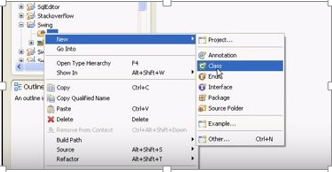
Select java project and then I put the project name as "Swing"


Then create a new class and I put the class name as "Frame"


And also I'm going to select the "public static void main(String[] args)"


To create any swing component will have to import our swing library or type like this.


Here, I'm going to make my objects like this.

"JFrame frame = new JFrame();"

and I'll pass the title of my frame in constructive JFrame class and title will be JFrame demo,

"JFrame frame = new JFrame( "JFrame demo");" 


Here also I have to call few methods. First method will be,

"frame.setDefaultCloseOperation();"
"setDefaultCloseOperation()" is a method which defines how our application ends. So it defines what happens when we click on exit button.


And  then I'm going to code like this.
" frame.setDefaultCloseOperation(JFrame.DISPOSE_ON_CLOSE);"

So some of your friends which have some experiences are probably wondering why I'm calling "DISPOSE_ON_CLOSE" instead of exiter close. Calling exiter close will end our application violently.

Next method I'm going to call is,
"frame.setSize();"
It's of course self-explanatory but it defines size for free in pixels and I'll set the size like this.
"frame.setSize(320,240);"

Last time that I'm going to call is, "frame.setVisible()" and of course it will make our frame visible. And as an argument I'll pass boolean "true".

"frame.setVisible(true);"


And then save it. Let's run the program and here it is.


Our JFrame with title "JFrame demo" and with its size of 320 with 240 and of course it's respond. In next tutorial I'm going to show you how to use JPanel.


Comments


  1. Nicley explained ! Keep up the good work

    ReplyDelete
  2. Good article Hasmie!!! Write more...cheers..

    ReplyDelete
  3. Good article for beginners!! Well explained..

    ReplyDelete
  4. Good article for beginners! keep it up..

    ReplyDelete
  5. Good article for beginners! keep it up..

    ReplyDelete
  6. job done well , keep it up!

    ReplyDelete
  7. well explained..!keep it up

    ReplyDelete

Post a Comment

Popular posts from this blog

Get & Post method

GET and POST http Methods Tragically there is a considerable misuse of GET over POST and the other way around. Both HTTP strategies can accomplish similar objectives, however an off base decision between them can prompt sudden and conceivably destructive results. In this way, to ensure we get things right, I present to you the conclusive guide of how to choose and use a GET or POST method easily :) Firstly, I’ll show you how to identify GET and POST methods. See the below defines. GET  - Requests data from a specified resource POST  - Submits data to be processed to a specified resource Simple Structures of GET and POST The query string (value pairs/name) is sent in the URL of a GET request: GET /test/demoForm.php ?name1=value1&name2=value2 HTTP/1.1 Host:webtech.com and in the body of POST requests: POST /test/demoForm.php HTTP/1.1 Host:webtech.com name1=value1&name2=value2 >> I have added code snippets of the GE...